Your Landscape Photos Look Flat Because You're Ignoring Atmospheric Perspective (Here's the Fix)

Your Landscape Photos Look Flat Because You're Ignoring Atmospheric Perspective (Here's the Fix)

There’s a specific kind of disappointment that hits when you open a photo that felt incredible to shoot and it just… sits there on your screen looking lifeless. No drama, no depth, nothing pulling you in. I’ve been there more times than I’d like to admit, and for a long time I blamed the light, or the lens, or some vague cosmic unfairness. Turns out the problem was usually in how I was processing the file, specifically the fact that I was treating the whole image as one flat thing instead of a scene with actual distance in it.

Fake It Till You Make It: Creating Convincing 3D Textures in Photoshop Without a 3D App

Fake It Till You Make It: Creating Convincing 3D Textures in Photoshop Without a 3D App

There’s a specific kind of client request that used to send me into a quiet spiral of dread. “Can you make the text look… dimensional? Like it’s actually part of the wall?” Sure, I’d say. Absolutely. Then I’d spend two hours nudging drop shadows around and delivering something that looked like a PowerPoint slide from 2009. The problem wasn’t effort. It was that I was reaching for the wrong tools entirely.

Stop Settling for Boring Skies: A Practical Photoshop Sky Swap Walkthrough

Stop Settling for Boring Skies: A Practical Photoshop Sky Swap Walkthrough

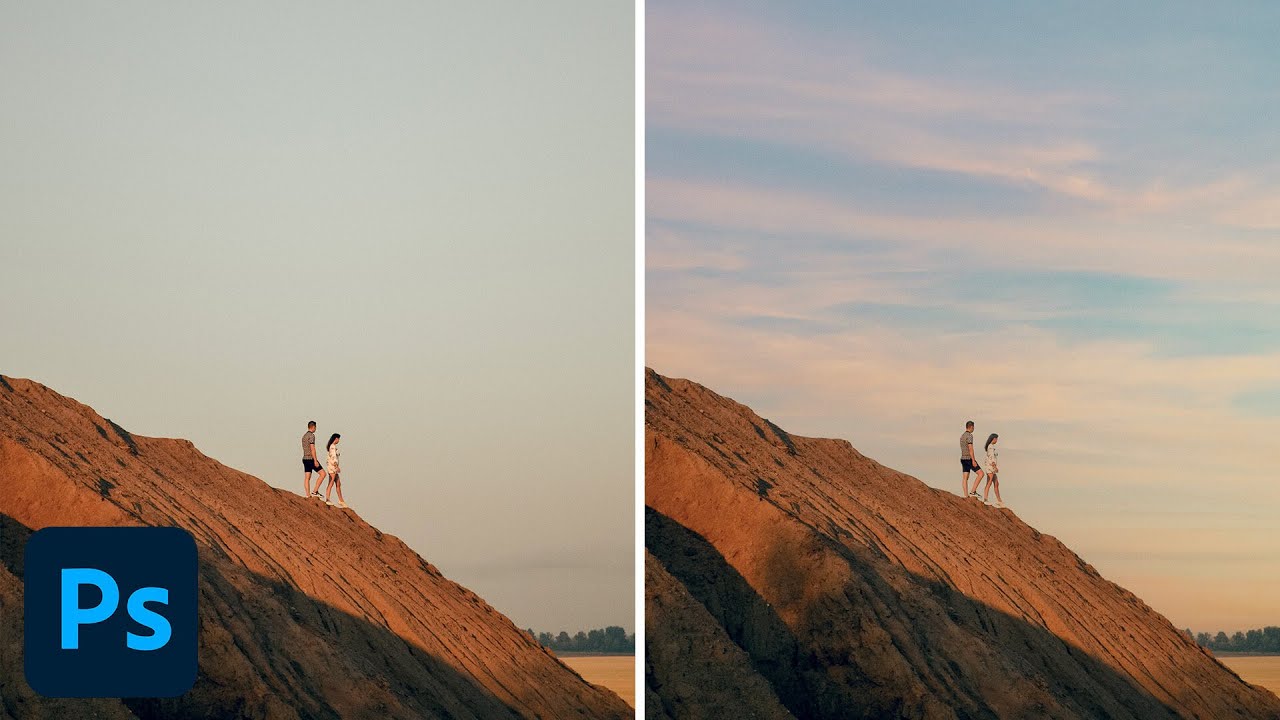
A few years back I spent the better part of a Tuesday stressing over a landscape composite for a client. The photo was solid — good light, interesting subject — but the sky was that flat, washed-out grey that makes everything look like it was shot in a Walmart parking lot. I knew the fix existed somewhere in Photoshop. I just didn’t know the clean way to do it without spending three hours masking individual clouds by hand like some kind of caffeinated monk.

Remove the Junk, Fix the Frame, Save the Shot: A Practical Photoshop Cleanup Workflow

Remove the Junk, Fix the Frame, Save the Shot: A Practical Photoshop Cleanup Workflow

There’s a specific kind of frustration that comes from spending two hours cloning out power lines and random visual garbage from a photo, only to realize you missed three of them. I’ve been there more times than I’d like to admit. It’s the kind of tedious work that makes you question your life choices somewhere around the 45-minute mark at your corner coffee shop table. So when I watched PHLEARN’s tutorial on cleaning up, reframing, and polishing photos in Photoshop, I immediately stopped what I was doing and paid close attention.

Making Rain in Photoshop That Actually Looks Like Rain (Not TV Static)

Making Rain in Photoshop That Actually Looks Like Rain (Not TV Static)

There’s a certain kind of client request that makes every freelance designer’s eye twitch a little: “Can you just make this photo look more dramatic?” No notes, no reference image, just vibes. I’ve been handed sunny, flat, completely unremarkable stock photos and asked to make them feel cinematic. Rain is one of the fastest ways to get there, and for a long time I was doing it the slow, ugly way.

Stop Telling Beginners They Need Photoshop (They Really Don't)

Stop Telling Beginners They Need Photoshop (They Really Don't)

Stop Telling Beginners They Need Photoshop (They Really Don’t) I spent years watching the same tired advice get recycled in every photography forum on the internet. A nervous beginner posts their first edit, asks for constructive feedback, and without fail, some keyboard warrior responds with: “You need to learn Photoshop if you want to be a real photographer.” I used to believe this myself. Back in 2012, it felt like gospel truth.

PiXimperfect Just Showed Us the Craziest Photoshop Tool of 2025

PiXimperfect Just Showed Us the Craziest Photoshop Tool of 2025

Photoshop Just Got a Dimension Upgrade Alright, I’ll admit it — when I first saw Unmesh from PiXimperfect pop up with a video titled about rotating photos in 3D, I almost scrolled past. I figured it was some gimmicky warp trick or maybe a Generative Fill hack dressed up for clicks. But no. This is a genuinely useful tool that Adobe has quietly slipped into Photoshop, and Unmesh does a brilliant job of showing exactly how deep it goes.

Photoshop's New General Distractions Tool: Your Secret Weapon for Cleaner Photos

Photoshop's New General Distractions Tool: Your Secret Weapon for Cleaner Photos

Photoshop’s New General Distractions Tool: Your Secret Weapon for Cleaner Photos Remember when removing unwanted objects from photos meant hours of cloning and healing brush work? Yeah, those days are increasingly behind us. Adobe just dropped a feature that’s about to save you serious time: General Distractions, the latest evolution of Photoshop’s remove tool. What’s New in the Remove Tool Arsenal Let’s be real—Photoshop’s remove tools have been getting increasingly smart.