The Photoshop Shortcuts That Actually Save Time (And the Ones You're Probably Ignoring)

The Photoshop Shortcuts That Actually Save Time (And the Ones You're Probably Ignoring)

I timed myself last Tuesday. Open file, adjust curves, mask the subject, flatten, export. Doing it the long way, clicking through menus like it was 2009, took me four minutes and eighteen seconds. Doing it with shortcuts took fifty-three seconds. That gap, multiplied across a full freelance workload, is the difference between finishing at 6pm or finishing at midnight, hunched over a laptop at a coffee shop while the barista gives you the “we’re closing soon” eyes.

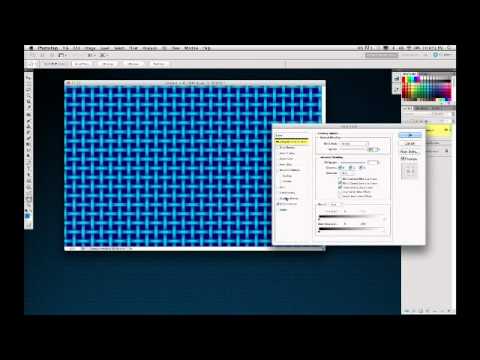
Three Photoshop Tricks Worth Stealing from Episode 277 (Edge Effects, Layer Style Shortcuts, and Preset Patterns)

Three Photoshop Tricks Worth Stealing from Episode 277 (Edge Effects, Layer Style Shortcuts, and Preset Patterns)

There’s a specific kind of frustration that comes from spending twenty minutes on a decorative edge treatment that should have taken two. I know it well. For a while, my go-to move was to mask everything by hand, paint around edges with a soft brush, and hope the result looked intentional rather than tired. It didn’t always. When I stumbled onto this episode of Photoshop User TV from KelbyOne, hosted by Dave Cross alongside Corey Barker and Pete Collins, I watched it mostly out of habit.

The Photoshop Shortcuts I Use Every Single Day (And the Ones I Wish I'd Learned Years Earlier)

The Photoshop Shortcuts I Use Every Single Day (And the Ones I Wish I'd Learned Years Earlier)

I used to watch a designer I knew finish a retouching job in about 12 minutes. Same job would take me 45. We were using the same software, the same version, roughly the same skill level. The difference was that he barely touched his mouse. His left hand was always on the keyboard, fingers moving like he was playing a chord progression he’d memorized years ago. I was clicking through menus like I was navigating a mid-2000s website.

The Photoshop Shortcuts I Use Every Single Day (And the Ones I Wish I'd Learned Sooner)

The Photoshop Shortcuts I Use Every Single Day (And the Ones I Wish I'd Learned Sooner)

I once watched a client sit next to me during a revision session and physically wince every time I reached for the menu bar. He didn’t say anything. He just sat there, quietly suffering, as I clicked through Edit > Transform > Scale like some kind of animal. After the third time, he finally said, “Do you not know Ctrl+T?” Reader, I did not know Ctrl+T. That was about six years ago.

The Photoshop Shortcuts That Actually Save Time (Not Just the Ones Everyone Lists)

The Photoshop Shortcuts That Actually Save Time (Not Just the Ones Everyone Lists)

I was sitting in a coffee shop last Tuesday, watching a guy next to me work in Photoshop. Every time he wanted to zoom in, he went up to the View menu. Every. Single. Time. I watched him do it maybe six times in ten minutes. I didn’t say anything because I’m not a monster, but I did quietly spiral thinking about all the hours that man has lost to that menu over the course of his life.

Blend Modes: Stop Using Normal Mode Like a Caveman

Blend Modes: Stop Using Normal Mode Like a Caveman

Blend Modes: Stop Using Normal Mode Like a Caveman Look, I get it. Blend modes seem intimidating. There are like 27 of them, they have weird names like “Overlay” and “Soft Light,” and nobody’s really explained what they actually do in plain English. So you’ve been sticking with Normal mode, layering stuff on top, and adjusting opacity until things look vaguely correct. We need to fix that. Right now. Here’s the truth: blend modes are just math formulas that tell Photoshop how to combine two layers together.